Linux has an abundance of excellent terminal applications. Interestingly, I could not find any decent comparison of their text display performance. Since I use the command line a lot, I want text output that is as fast as possible. When you compile a large project, you don’t want the console output to be the limiting factor.
System
Due to popular demand, here is what my test system looks like: Ubuntu 7.04, Gnome, ATI Radion Mobile 9600 with fglrx driver, and a Pentium M with 1.5 GHz.
The Benchmark
I took the burden on me to do a comprehensive comparison of the text through of all possible terminals. The benchmark is very simple, I timed displaying the whole content of RFC3261. Download the file if you want to make your own benchmarks. The benchmark is executed like this:
time cat rfc3261.txt
I have measured the time in seconds. Without further ado, I give you the results (click here for a better readable PDF version):
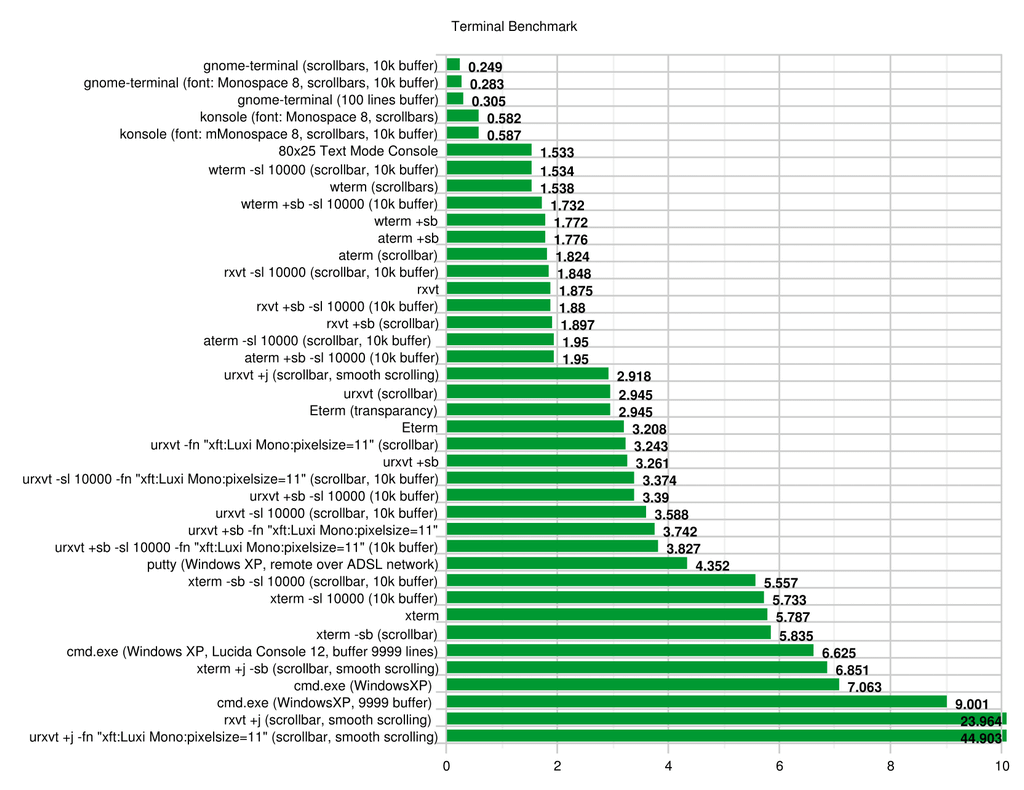 Runtime in seconds timed with time cat rfc3261.txt
Results
These are some very interesting results:
-
Both
gnome-terminalandkonsoleare exceptionally fast, it takes only 0.25 to 0.59 seconds to display the 647976 bytes large file. They buy the speed with quite a bit of memory consumption, and it can be clearly seen that the output does not smoothly scroll but only updates several times per second. This is a clever trick and has the advantage of being extremely fast, because not every letter needs to be pumped through the X windowing system. If you compile a lot or have other automatically generated output,gnome-terminalandkonsoleare the clear winners. -
konsoleuses a lot of memory, about 32 MB. When setting the history buffer to 10.000 lines, it increases to 38MB per instance. -
gnome-terminalhas a very different memory behavior. When you open multiple terminals, they are all memory managed from onegnome-terminalinstance. This one instance requires about 45 MB freshly started. When opening multiple terminals and each one with 10.000 lines of used buffer, each terminal requires about 16 MB, so when you open more than three terminals at once you have already lower memory requirements than when usingkonsole. -
xtermis the slowest terminal. While it is probably the most widely used term, the only slower terminal is Microsoft Window’scmd.exe! Each instance requires 16 MB RAM, which is a lot in comparison to other terms with similar features. -
wtermis both reasonably fast and the most memory efficient of all tested terminals. Each instance requires only about 6.3 MB of RAM, even with 10.000 lines of buffer. Only aterm but without buffer comes with 6.5 MB pretty close. -
Etermis quite fast and memory efficient (9 MB), even with transparency.
Conclusion
So, what is the best terminal? The answer is actually quite simple:
- If you want speed, use
gnome-terminalorkonsole. - If you are low on memory, use
wterm,rxvt, orEterm. xtermis slow.
UPDATE: Of course, the answer is actually not so simple. As some have told me, they get a quite different performance behavior on their system. I suspect that both the linux scheduler and the X scheduler has a lot to say in this issue too. So if you want to have results you can trust, you have to redo the benchmark on your machine. Fortunately, that’s simple: just cat a large file and measure the time it takes. Be sure to run it multiple times to get more accurate average numbers.
Other Remarks
- Windows does not have the time command, so I wrote a simple Ruby script that does the same thing:
before = Time.now
system(ARGV.join(" "))
after = Time.now
puts "#{after-before} seconds"
Also,
cmd.exeonly allows 9.999 lines of buffer. - If you want to display bitmap fonts in
gnome-terminal, edit~/.fonts.confand add these lines right after the opening tag:<!-- Accept bitmap fonts --> <selectfont> <acceptfont> <pattern> <patelt name="scalable"><bool>false</bool></patelt> </pattern> </acceptfont> </selectfont>
I hope this is helpful in your choice of the best console.