Howto Get Enough Sleep Despite StumbleUpon with Ubuntu
What?
I am a long-term StumbleUpon user, which means that I don’t get much sleep. Now, after almost 4 years of stumbling, I have decided to get my life back. Well, at least some sleep!
What does this do?
Every night when I have to work on the next day (Sunday night to Thursday night ), at 23:25 my computer shows me this little warning message:
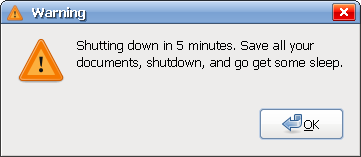
After the 5 minutes have passed, the computer shuts itself automatically down.
I use this little trick with Ubuntu, but it should work anywhere where Gnome is installed.
How?
Thanks to the power of Linux, this is not difficult to do for yourself, and configure it however you want it to behave:
- Open /etc/crontab with your favourite text editor (no need for crontab -e since this is the system wide crontab), e.g.
sudo gedit /etc/crontab
- Add the following lines (replace manker with your username!)
25 23 * * 0-4 manker /usr/bin/zenity --display :0 --warning --text="Shutdown in 5 minutes. Go to bed." 25 23 * * 0-4 root shutdown -h +5
- The first part of both lines 25 23 * * 0-4 means that the commands are executed at 23:25, but only Sunday (day 0) to Thursday (day 4). Read man 5 crontab for a detailed description of that format.
- The first command uses zenity to show a warning message. You have to execute this as the same user that you use for working, or you will not see the message, so change manker to your username (root does not work either).
- The second command shutdown -h +5 means that the computer will halt in 5 minutes. This has to be run as root, and it also shows nice warning messages in all your open terminals so you can’t really miss it.
- Save the file, and stumble until it is 23:25.
Sweet dreams!
72 Responses to “Howto Get Enough Sleep Despite StumbleUpon with Ubuntu”
Leave a Reply
I need to try this!
I keep staying up very late..
Lol, I’ve never been so addicted to Stumble ^^
But for the windows users just add a new task in the Task Sheduler
This is very useful, but usually I stumble before I work, so when I start working at about 1 o’clock in the morning I’d hate to have this bothering me.
Great idea! I can’t begin to imagine how many hours I’ve lost to StumbleUpon. The worst is when you’re stumbling and you know you should stop.. but you just… can’t.. make.. yourself.. stop!
This meeting of Stumbleoholics Anonymous is hereby adjourned.
@K: You can change some of the numbers around. Just be careful what you’re changing…
! Ha! Great idea, I was addicted to StumbleUpon for about one year, than I got out of it after moving to Ubuntu, where I managed to resist installing SU toolbar for some weeks and after that I try to keep the usage of it low. It can eat all your time
PS: Ofcourse I came here through Stumble Upon!
I am not that much Stumble addicted. Anyways, it is gud to know new ideas.
Thank you…
There are lot of tools in Windows which will do the same thing
Nice trick when stumbleupon is like crack LOL
Haha. Thumbs up in my StumbleUpon… now if only I could pull myself away from the browser long enough to edit crontab LoL.
Crontab : Scheduling Tasks
@Tucks: thanks for the link, but I would not use user specific crontab for this, because shutdown only works as root, so you need to edit root’s crontab for shutdown, and your user one’s for the info window. Better use /etc/crontab directly.
Mac users can just go to power saving settings in system preferences to do the same thing!
excellent, just what i needed, it works with kubuntu.
thanks and greetings from uruguay.
That seems like a great idea … their is a challenge tho … what do you do when you run a .com from home, and your computer is the server?
I guess I could tell it to run /etc/init.d/kdm restart in 5 min instead of shutdown.
Good idea though.
That’s great but I would just turn the computer back on as soon as it finished shutting down:)
Why do I have to go to sleep?
perfect!!! i like it:))))
You don’t really need gnome for this to work…
Just make sure you have Zenity installed, and substitute gedit with any other editor, such as Nano or in my case Vim.
Otherwise, smart use of crontab, it’s just not really stumble specific. Now if you had made a script that would only click the stumble button 3-4 times an hour… I’d take it.
Christ alive what a pointless bloody article.
How about looking at your watch and knowing how much sleep you need?!
@harry some people like me need a kick in the but to do this, automatic shutdown is the next best thing
Hahahahaha I stumbled on this
5 minutes?
From ‘man shutdown’:
-c Cancels a running shutdown. TIME is not specified with this option, the first argument is MESSAGE.
I’m an enabler.
Thanks for the idea.
I took away the shutdown feature and left only the reminder. I changed the text within the “quotes” to make it more of a friendly reminder than a warning.
Tip: type “zenity –help” in terminal to get a list of other window types to display for instance “–notification”.
What would be cool is if someone wrote a –question script that asked “are you working or playing?” -If you say working it does nothing. If you say playing it kindly helps you stop by shutting the system down.
you should try making also another script to prevent you from restarting the PC after 10 minutes because you’ll probably won’t resist and start stumbling again. it should be a script that checks the system’s time and if it’s between 23:25 and 03:00 then it should shutdown again in 1 minute.
Very cool trick! Gonna try it on PCLinuxOS. Unfortunately it isn’t stumble that’s eating my time, its actual work LOL
Isn’t it ironic that I found this through StumbleUpon…? ;oP
omg. there are others like me?!?!?!?!!?
staying up until the wee hours of the morning, continuously hitting the “Stumble!” button. over. and over. and over. and over. AND IT’S ALWAYS SOMETHING DIFFERENT!! gawd. i have even replaced my regular TV shows with “StumbleVideo”
we are entering a new age.
my name is Pollux…and i have a problem. \^.^/
No. NO! NOOOOOOOO!! I don’t want to go to bed! ONE MORE CLICK!!!
Hahah, that’s awesome, thanks!
You can do this with Windows, too:
Use scheduled tasks in the control panel to have it run “Shutdown.exe -s -t (seconds) -c “Time to get some sleep!”" every night at whatever time you want.
This is great, this is my 3rd night on Stumble Upon, and found myself up until 5AM the first night, so I certainly see where this would come in handy. I will be using this! Thank you for sharing! Love Ubuntu and Beryl too!! Hasn’t ceased to amaze be yet.
Mike
Thank you so much! Now I’ll finally start sleeping…
it was really funny that i stumble this site with my ubuntu (gutsy) box. haha first, i thought it’s a trick that webpage analyzing my system
i’ll give a try
Nice hack, but I think I’d end up turning it off after it warned me. xD I’d have to make it do a random time between 11pm and 12am and give no warning, and hopefully I’d forget about it. (Maybe random days as well?)
Good idea. I’d need an override though, like any good addict, I just want to stumble one more time. I can quit any time I want!
I have it both ways, my pc laptop is windows with su and my home pc is ubuntu with su. When I’m compiling or copying something big with one pc, I can stumble with the other. Its awesome to have them both going at the same time. I actually use this method to quit for the night…
When I see a site I’ve already seen today, I call it a night. – Ah hell, just one more.
Hi Martin,
Well this is nice trick ! However, for me it probably would not work, because then I start thinking: Is it really necessary to turn off my box just for 6 or 7 hours
Cool down all hardware and then heat it up again after couple hours can be costly. The hardware will suffer and I will need to replace it !!!:-) Moreover I’m not using MS Windows so I really do not need to restart !!
I think I will need to go for modified version similar to your but different :
for f in $(seq 1 25200); do sleep 1; echo $f; done | zenity –progress –width 530 –pulsate –text ‘Leave Me Alone and go sleep ! See you in 7 hours. — Regards your PC’ –title ‘Sleeping and therefore I am not Listening to any IRQ calls’
So tell me which version is better for Linux users ? Yours or mine?
lubo
This is great. I really need it!
Great to learn about crontab syntax. But what is this ever going talk about stumbling depriving people from sleep? I’m getting same pages from stuble quite often and sometimes it says I’ve seen all from some category. I’s also less time consuming to get links from stumbler than anywhere else.
Hi lubo,
Thats a nice and annoying idea
But I prefer my method because I don’t want to waste electricity on machines that I do not use.
Wow. That’s neat.
That’ll work on ANY Linux distro! Try it!
(Christ. This “lol ubuntu” stuff is driving me nuts. Cause… y’know, the linux kernel is the linux kernel no matter WHAT you have on top of it.)
Please for god’s sake use “crontab -e” to edit the file.
If needed, you can export EDITOR=’nano’ if you can’t handle vim
Daenyth, “crontab -e” is only required when you edit the user’s crontab so that they are installed. When modifying /etc/crontab you dont need to run this, see the header information of /etc/crontab.
I really like this idea. I could really do with an application like that. I spend far too much time on my computer.
Would this work on Mac OS X, asumming that the OS is similar?
I’ll bookmark this page for now. Just one more Stumble…
This is exactly what I need!
One small problem: it doesn’t all work.
It does shutdown, but I get no warning, so have been caught out when I was not aware of the time & had not saved everything before hand.
Tonight I have written scripts to get zenity to work; I hope they will!
Hi Ian, what does not work? The only problem I have is that the warning is not visible when I watch a movie with mplayer in fullscreen.
I get no message via zenity to warn of the time & shutdown. When launched from the command line / script it works fine, but not from within crontab.
What else is running has no effect.
Any ideas would be welcome. Scripts are OK when they work, but I get frustrated when something like this beats me!
… and even the scripts will not work.
I have a script that makes a sound, and uses zenity to produce a pop-up.
The sound plays, but the pop-up will not appear.
-> at least I know the script is being called, but it is useless when I have the sound turned off (most of the time)
…
Hi ian, the only thing I can think off is that you have to use the same username in the crontab that is currently using the desktop. also make sure that you are editing /etc/crontab and are not using “crontab -e”, this file has a different syntax.
You can also try kdialog instead of zenity:
I have the same problem as Ian. Shutdown works a treat, but without the warning popping up.
Can it possibly be something to do with rights? That I shuld do some chmod action? Can somebody enlight me, please?
Maybe the “I ain’t got no warning” people don’t have zenity;
for Ubuntu and other Debians, you may need to:
sudo apt-get zenity
From a shell or the run dialog, try;
zenity –display :0 –warning –text=”Is this thing on?”
or (definitely from a shell);
which zenity
to test whether you have it.
But who shuts their machine off? BOINC has got work to do.
FYI for anyone on Ubuntu not getting warnings. Try the command “xhost +” I couldn’t get warnings until I found the solution on this website. This disables access control (might be a bad thing).
http://preview.tinyurl.com/6q4n6l
I now have warnings. Not sure if this opens a security hole on my system though. Time to go RTFM.
Great idea! Ingenious and simple. Updated my crontab directly. Gonna get my sleep back! Thanks a lot!
Oh THANK YOU THANK YOU THANK YOU THANK YOU THANK YOU THANK YOU THANK YOU THANK YOU THANK YOU!!!!!!!!
I’ve had the BEST sleep last night in bloody AGES!!
THANK YOU *SO MUCH*!!!!!
lol
[...] zainspirowany tym wpisem (skądinąd znalezionym dzięki StumbleUpon…): http://martin.ankerl.com/2008/01/24/howto-get-enough-sleep-despite-stumbleupon-with-ubuntu/ Brak komentarzy, Zostaw komentarz lub [...]
omg! it’s a dign.. that i should go to sleep, I stumbled upon this.. using ubuntu at 12:20 am >_< good night
Mate Really nice and usefull Tip
thanks for sharing
Oh how I get sucked into Stumbleupon sometimes. In fact I found this page on Stumbleupon.
Giving it a thumbs-up!
Thanks a lot man, this helps my Stumble addiction.
[...] post about me struggling with getting enough sleep despite StumbleUpon was by far the most viewed article on the blog, it has received more than 4 times as much visits as [...]
how about the atd.
its not always sure you want to shut down your whole pc in 5 minutes every day at a specific time.
type something like that:
sudo at now + 1 hour
xmessage go to bed already
shutdown -h +5
Dude Thats Cool!!
[...] منبع دستور cron در ویکی اوبونتو Categories: لینوکس برچسبهالینوکس, گنوم, اعتیاد, ترفند, خاموشی دیدگاهها (0) بازتابها (0) دیدگاهتان را بنویسید: بازتاب [...]
that is so awesome!
the ironic thing is i stumbled upon this
haha STUMBLED!! why must this be so addictive?
Didn’t know zenity yet, very n1, thx
[...] 原文Link。 You can follow any responses to this entry through the RSS 2.0 feed. You can leave a [...]
I think “–display :0″ must be “–display=:0″
Isn’t it?
Hi polaris, I have just tried it, both --display :0 and --display=:0 work.
The --display parameter needs to be on the same display as X is currently running, which is stored in the $DISPLAY environment variable. Unfortunately this variable is not set when running from crontab, so I have just hardcoded :0. To find out where your X is running, type echo $DISPLAY and then add this output to the crontab.
I love this, I am also a Ubuntu users. It is 10.30AM right now here in Las Vegas, Nevada and I have been stumbling from 5.30AM. I Stumbled to this site. I guess that is a hint that I need to put some kind of timer on my stumbling.
You could also try Workrave. It’s a pretty cool and healthy little app.