
oans is a deduplication tool for btrfs and XFS, forked from Mark Fasheh’s duperemove. I wanted to dedupe a big, mostly unchanged tree every week, and a re-run took about as long as the first run. Now a re-run on an already deduplicated tree with 2.07M files and 230 GiB takes about 92 seconds, where duperemove 0.15.2 takes about 11 minutes. When the tree is larger than RAM, even the first run is about 13x faster.
I am looking for feedback. So far nearly all testing happened on my own machines with my own data, and that’s a rather narrow sample.
The name is Austrian dialect for “one”. My daughter drew the logo: lots of small ones, and one big one. That is more or less what deduplication does.

The numbers first
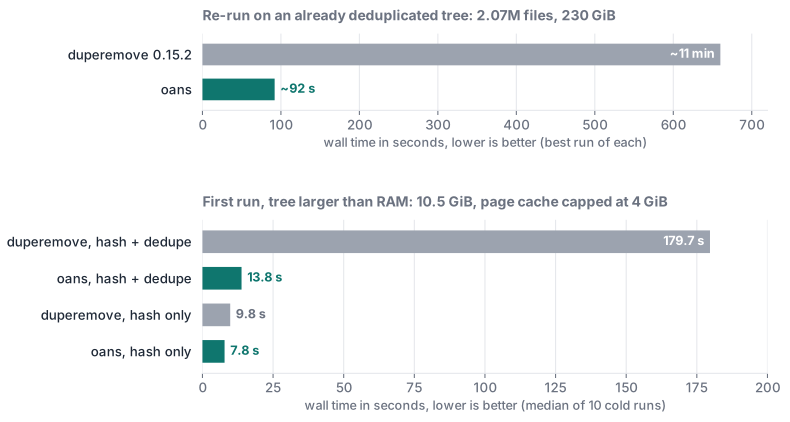
The “hash only” bars are there on purpose: without the dedupe phase oans is only 1.3x faster, because both tools have to read the same 8.4 GiB from disk. The larger-than-RAM numbers are the median of 10 cold runs on a Ryzen 9 7950X, 62 GiB RAM, a Corsair MP400 NVMe with btrfs, kernel 7.1.3, measured in July with oans 1.3. The re-run number is from a real tree of mine, fastest of interleaved runs. Methodology and a script to reproduce it on your own data are in docs/benchmarks.md.
A bug in oans can only waste time
On btrfs and XFS two files can point at the same stored data, cp --reflink does that on
purpose. Deduplication does it after the fact, with the kernel’s
FIDEDUPERANGE ioctl:
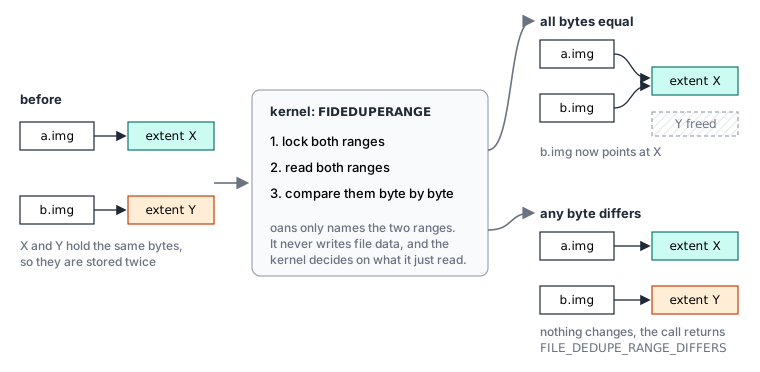
oans never writes into your files. It hashes them, finds candidates, and names two ranges. The kernel locks both, compares them byte by byte, and shares them only if every byte is equal. Which means that whatever bug oans has, the worst outcome is wasted time, or a duplicate that stays unshared.
A few days ago I fixed exactly such a bug (#303): on compressed btrfs, oans gave a file a wrong hash. All that happened was a kernel compare that said no. The hashfile is only a cache, Ctrl-C is safe at any point, and the next run resumes.
Most of the speed comes from not doing work
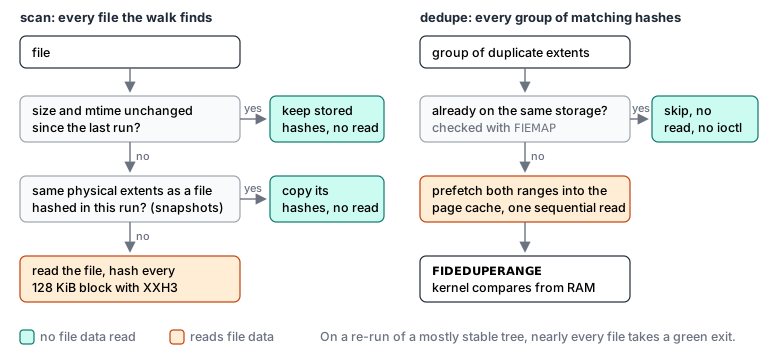
Files with unchanged size and mtime keep their stored hashes, that part is from duperemove. oans
adds a FIEMAP check in front of the dedupe phase: if a file’s extents already point at the
same storage as the target, it is skipped without reading a byte or calling the kernel. On a
tree that was deduplicated last week that’s nearly every duplicate, and as far as I can say it
is where most of the 11 minutes to 92 seconds comes from.
Snapshots share their extents, so if a file’s physical layout is identical to one already hashed in this run, oans copies the hashes instead of reading the file again. On 4 snapshots of a 7.5 GiB subvolume the scan went from 2.36 s to 0.65 s.
When the tree is larger than RAM, the kernel reads it twice
The kernel’s compare reads data that oans hashed a while ago. On a NAS with little RAM that data
was evicted long ago, and unfortunately btrfs does no readahead in that compare path: I measured
about 50 MiB/s on an NVMe that reads GiB/s sequentially. So right before each FIDEDUPERANGE
call, oans reads both ranges with a plain sequential read, and the kernel compares from RAM.
My machine has 62 GiB of RAM, so for the benchmark I limited the page cache to 4 GiB and used a 10.5 GiB tree, two copies of a Linux kernel git tree:
| median of 10 runs | duperemove 0.15.2 | oans |
|---|---|---|
| hash + dedupe, wall time | 179.7 s | 13.8 s |
| hash only, wall time | 9.8 s | 7.8 s |
| peak RSS, hash + dedupe | 243 MiB | 121 MiB |
| hashfile size | 70.9 MiB | 39.7 MiB |
Both end with exactly the same bytes shared, btrfs filesystem du -s reports identical numbers
after either one. This was an NVMe. On spinning disks the cold re-read is much slower, so I
expect the gap to be larger, but I have not measured it.
Trying it
There is a prebuilt x86_64 tarball on the releases page, or build it from source, the README lists the dependencies:
make && sudo make install

# dry run: hash and report what could be shared, touch no file
sudo oans -r --hashfile=/var/cache/oans/data.hash /srv/data

# hash and deduplicate
sudo oans -dr --hashfile=/var/cache/oans/data.hash /srv/data

# every run after that: the hashfile remembers paths and options
sudo oans --hashfile=/var/cache/oans/data.hash
oans --history shows how much space each run freed, and sudo make install-systemd installs a
weekly timer. The command line is mostly duperemove’s, so existing scripts keep working.
Where I need feedback
- Numbers from your data, especially from spinning disks and NAS boxes with little RAM, which I don’t have.
- XFS. CI tests it, but I barely use it myself.
- Anything in the output that looks wrong, e.g. a reclaimed number that does not match
compsizeorbtrfs filesystem du. - Bugs go into the issues, questions into the discussions.
oans is an offline batch tool. If you want a daemon that deduplicates the whole filesystem
continuously, bees is the tool. On compressed btrfs the
Reclaimed figure is logical, so the real space freed is smaller by roughly the compression
ratio. And deduplication fragments files, as any dedupe tool does, while
btrfs filesystem defragment unshares the extents again. The original design is Mark Fasheh’s and the
duperemove contributors’, and oans would not exist without it. If you try it, I’d like to hear
how it went, good or bad.